
The scale that was a Raspberry Pi
Some time ago I had to integrate an application with a commercial scale that connected through a USB serial port. The idea was to stop depending on the physical device all the time to move the integration forward.
So I put a Raspberry Pi Zero 2 W in its place, in USB gadget mode: the Pi
presents itself to the computer as a serial device, and the computer has no
idea there is a Raspberry behind it. It sees a port, sends a P and gets a
weight back.
We didn’t need the Raspberry to weigh anything. We needed it to talk like a scale.
That project has no documented application bug that the emulator found, and I am not going to make one up. What I did now was rebuild the emulator the way I would build it today, run it on a real Pi Zero 2 W, and measure what happens when the scale misbehaves.
All the measurements in this note are from October 30, 2026: a Raspberry Pi Zero 2 W (Raspberry Pi OS on Debian 13, kernel 6.18) in gadget mode, mounted on a USB-A adapter and plugged into a USB-C hub on a MacBook Pro (macOS 27). The protocol is generic, shaped like the original scale’s, without its brand. The figures belong to this setup: another computer, another hub or another operating system will give other numbers.
What the protocol says, and what it doesn’t
The scale’s documented protocol is short: serial at 9600 baud, 8 data bits,
no parity, 1 stop bit (9600 8N1). The computer sends the ASCII character P
and the scale answers with the weight in ASCII. In the experimental version
it had the form +12.5.
That version also sent the weight on its own every 5 seconds, without being asked. That was for testing: not every model transmits on its own, and the new emulator has it as an option that is off by default.
There are two things I can’t confirm about the original protocol: the exact
terminator of each answer, and whether there were extra fields. The emulator
ends each answer with \r\n. That is my assumption, and the code says so.
That gap matters more than it looks. The emulator checks the behavior we modeled, not what we don’t know about the original device.
Three layers
The emulator is split into three parts, each one unaware of the others:
- Transport: open a serial port and move bytes. It works the same for
/dev/ttyGS0on the Pi, for the port the computer sees, and for a virtual port in the tests. Over the USB gadget the 9600 baud doesn’t apply: the port is set that way because it’s what the application expects to open, but the bytes travel at USB speed. - Protocol: the
Pand the+12.5frame. Nothing else. - Behavior: what the weight is and how the scale acts: a fixed or fluctuating weight, and a fault mode.
The fault mode has six actions: answer normally, answer late, don’t answer,
send half a frame, send a frame with a broken format, and close the port. You
ask for them with a scripted sequence (--guion) or at random with a seed,
so a run can be repeated:
python3 emulador.py --puerto /dev/ttyGS0 --guion "normal*5,tardia:800,sin_respuesta,incompleta,invalida"
It is all Python with the standard library: it runs on the Pi Zero without installing anything. It has 25 tests that need no hardware; the query tests put the emulator on one side of a virtual port and the application on the other.
Two measurements that don’t mix
There are two different times, and it’s better not to add or subtract them:
- The emulator’s: on the Pi, from receiving the
Puntil the answer has finished going out. - The application’s: on the computer, from just before sending the
Puntil the full answer arrives. It includes USB, the hub and the operating system’s read.
Each one is measured with its own machine’s clock. With 1,000 requests, one every tenth of a second:
| median | p95 | max | |
|---|---|---|---|
| Emulator (Pi) | 0.16 ms | 0.29 ms | 0.35 ms |
| Application (Mac) | 0.47 ms | 0.66 ms | 0.94 ms |
All 1,000 came back with a valid weight. Mind what this measures: it is the emulator over USB, not a scale. A real scale at 9600 baud would take at least about 7 ms just to transmit the 7 bytes of the frame, plus however long it takes to weigh, which I don’t know.
When the scale misbehaves
Then, 300 requests with random faults (fixed seed), with a 10% chance of a late answer (800 ms), 5% no answer, 5% incomplete frame and 5% frame with a broken format. The application waits up to 1 second.
| The emulator | Times | The application saw | Median (Mac) |
|---|---|---|---|
| normal | 210 | valid | 0.52 ms |
| late | 41 | valid | 800 ms |
| nothing | 21 | no answer | 1.0 s |
+12 |
13 | incomplete | 1.0 s |
+1?.5 |
15 | invalid | 0.5 ms |
All 300 were classified as what they were. But two things don’t show up in an error counter.
The 41 late answers count as valid. If you only count successes, the scale looks perfect. What gives them away is latency: the valid answers have a median of 0.55 ms and a p95 of 800 ms.
And an incomplete frame costs the same as silence. In both cases this application waits the whole limit, because it reads up to the terminator with a single limit and can’t know whether the missing part is on its way. The broken frame, on the other hand, is caught in half a millisecond.
The disconnection
Disconnecting a real scale means pulling the cable. With the Pi that has a problem: the same adapter that carries the data also powers it. Pull it and the Pi shuts off abruptly, and that is not a disconnected scale.
The emulator’s own action that closes its port doesn’t work either: the USB link stays up, and the computer sees silence, not a port that disappears.
So I tried it two ways.
With the cable, and a separate power supply
I connected a power supply to the Pi’s power port so it would stay on, and unplugged the adapter by hand. The first unplug looked right: the Mac lost the port. But after plugging it back, the Mac no longer saw the Pi, and then not even the hub, on any port. Without the Pi, the hub came back.
Most likely the Pi was powering the hub backwards: on the Zero, the power port and the data port share the same 5 V line. I only confirmed that the Pi was what knocked it out; I didn’t check the mechanism, and I didn’t repeat the test so as not to risk pushing voltage into the Mac’s port.
There was another detail: during that whole test, the Pi kept saying it was connected. In that setup, the Zero never noticed the computer was gone.
In software
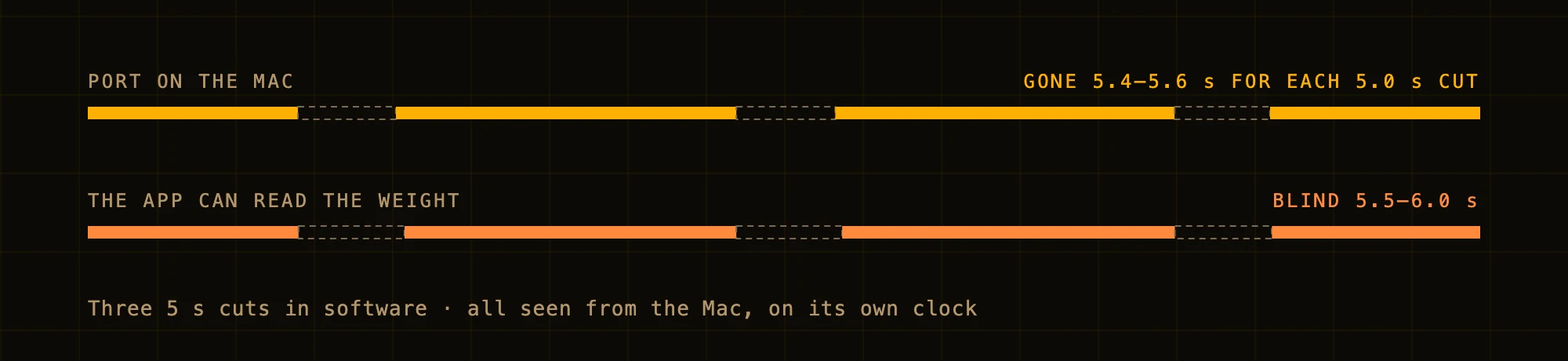
With the Pi powered only by the adapter again, a script asks the USB controller to let go of the line for 5 seconds and take it back. To the Mac it is an unplug: the port disappears and comes back. Three cuts, 20 seconds apart.
The first run had a surprise. The lab’s test client, the one that plays the application for the measurements, survived the first cut and crashed outright on the second.
On the first one, the first call to notice the port was gone was a read or a
write, and that error was handled. On the second, it was the call that
flushes the buffer before asking. That call raises a different kind of error
(termios.error) that doesn’t look like the others, and nothing was catching
it. Whether an application survives depends on the exact instant the cable
goes.
def _termios(fn, *args):
    try:
        return fn(*args)
    except termios.error as e:
        raise OSError(*e.args) from e
With that, the second run survived all three cuts. The Pi let go of the line for 5.0 s each time:
| Cut | 1 | 2 | 3 |
|---|---|---|---|
| Mac without the port | 5.59 s | 5.65 s | 5.44 s |
| Application blind | 6.04 s | 6.04 s | 5.54 s |
| Pi: configured again | 0.36 s | 0.43 s | 0.22 s |
The first two rows are measured on the Mac’s clock; the third on the Pi’s, from the moment it takes the line back.
2,997 valid requests and three marked as disconnected, one per cut. The first request after each return brought back the right weight.
With 5-second cuts, the application stays blind between half a second and a little over a second longer than those 5. Part of that is the time USB takes to present the device again. The other part is the application’s own retry interval, half a second.
This time the Pi did notice every drop: the USB controller went to “not attached” and Linux hung up the emulator’s port. The controller also marks when the computer recognizes it again. The emulator, reading its port, doesn’t know that: it reopens it and waits.
What isn’t in the protocol
There are details no scale manual covers.
On macOS, the port was called cu.usbmodem1301, then cu.usbmodem21301,
then cu.usbmodem11301: it changed when I unplugged everything and set it up
again, and when I moved the hub to another port on the Mac. Across the three
software cuts, on the other hand, it came back with the same name. An
application that saves the port name breaks with something as simple as
moving a cable.
In the original project, opening the port on macOS with screen failed with
$TERM too long; it was fixed with TERM=xterm. The hard parts aren’t always
in the protocol. Sometimes they are in the tools you test it with.
What we don’t know
- The terminator and any extra fields of the original protocol.
- A physical cable disconnection, actually measured. It needs an adapter that cuts the power and lets the data through.
- Windows: what the COM port is called, whether it needs a driver, and whether it changes on reconnect. The original project considered it, but I don’t have it documented, and I didn’t measure it here.
- Other hubs, other cables, other computers. All of this is a single setup.
What I would do
- Separate transport, protocol and behavior from day one. That way the same engine works for another interface or another protocol.
- Test reconnection, timeouts and validation on the application side, with a fault mode that can be repeated.
- Measure the emulator and the application separately, each with its own clock.
- Don’t save the port name: look it up every time you open it.
- Treat any port error as a disconnection, not only the ones you already know.
The emulator, the client, the tests and the data from every run are in the repository.
A good simulation doesn’t replace testing with real hardware. But it lets you get there with far fewer unknowns.
Israel Negrete Lepe is an electronics engineer. Twenty-five years making different systems work together under real conditions: from the sensor, the vehicle or the transaction to the backend, the data, security and operations. Today, increasingly, edge AI. I take on projects by the hour or by deliverable: israel0negrete@gmail.com.